Timely-ne

Timely-ne

Timely-ne

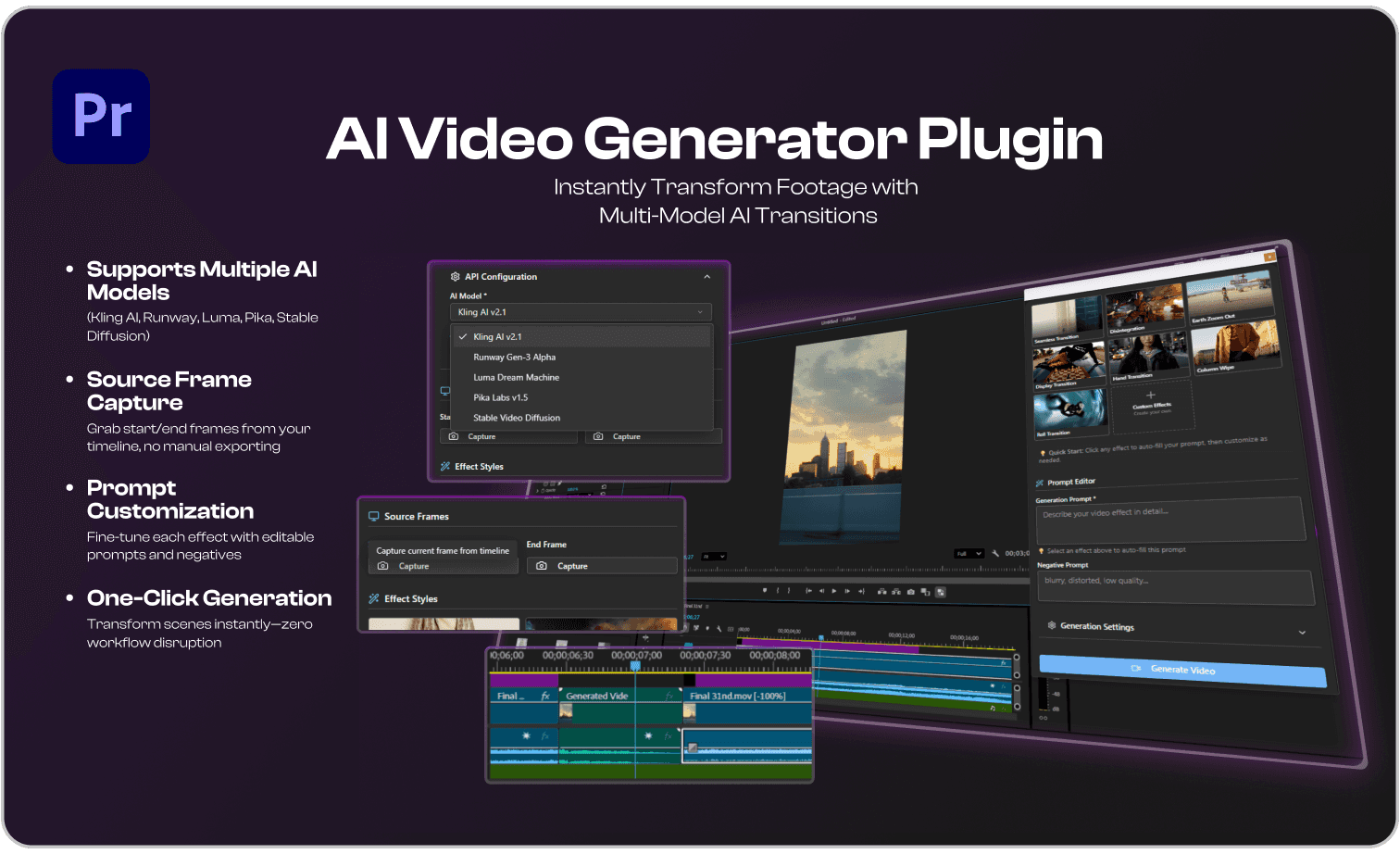
AI Video-Generator

Bridging Editing Timeline and AI

With Multi-Model Support
Role

Lead Product Designer

Timeline

2025

Tools

Figma, React, TypeScript, Lovable

Sector

Media Production

Overview

Film productions are increasingly distributed crews spread across cities, editors working remotely, and clients expecting rapid feedback.

AI video effects have revolutionized visual storytelling, but editors still face major workflow friction. Despite innovations and native model like (like Adobe Firefly), creators often have to exit their main editing suites (Premiere Pro, DaVinci Resolve, Final Cut Pro) and rely on web-based tools, then manually shuttle files back and forth.

This disconnect results in disrupted creative flow, fragmented project management, and wasted hours. On top of that, every AI model has unique capabilities but requires separate learning and setup, forcing editors to juggle multiple interfaces, stay updated on rapid changes, and make repeated tradeoffs.

There’s no unified, all-in-one solution for generating, customizing, and previewing AI video effects natively inside professional editing platforms. The result? Creative energy is drained, timelines slow down, and innovation stalls making this problem space unique for reimagining with smarter, truly integrated AI workflows

AI video effects have revolutionized visual storytelling, but editors still face major workflow friction. Despite innovations and native model like (like Adobe Firefly), creators often have to exit their main editing suites (Premiere Pro, DaVinci Resolve, Final Cut Pro) and rely on web-based tools, then manually shuttle files back and forth.

This disconnect results in disrupted creative flow, fragmented project management, and wasted hours. On top of that, every AI model has unique capabilities but requires separate learning and setup, forcing editors to juggle multiple interfaces, stay updated on rapid changes, and make repeated tradeoffs.

There’s no unified, all-in-one solution for generating, customizing, and previewing AI video effects natively inside professional editing platforms. The result? Creative energy is drained, timelines slow down, and innovation stalls making this problem space unique for reimagining with smarter, truly integrated AI workflows

Why is it a problem?

User interviews were conducted with participants representing every stage of the production pipeline from production managers to end clients.

Constantly switching between AI models drains time and creativity

It’s impossible to know

which version

there’s no all-in-one solution, and staying updated is a struggle.

It’s impossible to know

which version

Project assets are scattered, versioning becomes difficult,

After the event, I want to easily

review and leave feedback

and creative flow is broken.

and creative flow is broken.

Frequent manual exporting/importing between apps

It’s stressful explaining why a

specific shot can’t be fixed

Non-native interfaces: jumpy visual context, difficult adoption

Clients sometimes hand us a reference

while we’re

High learning curve for prompt-based AI effects unclear what works.

Notes from producers get

mixed up between text,

Deep dive into AI Generation Platforms

Film productions are increasingly distributed crews spread across cities, editors working remotely, and clients expecting rapid feedback.

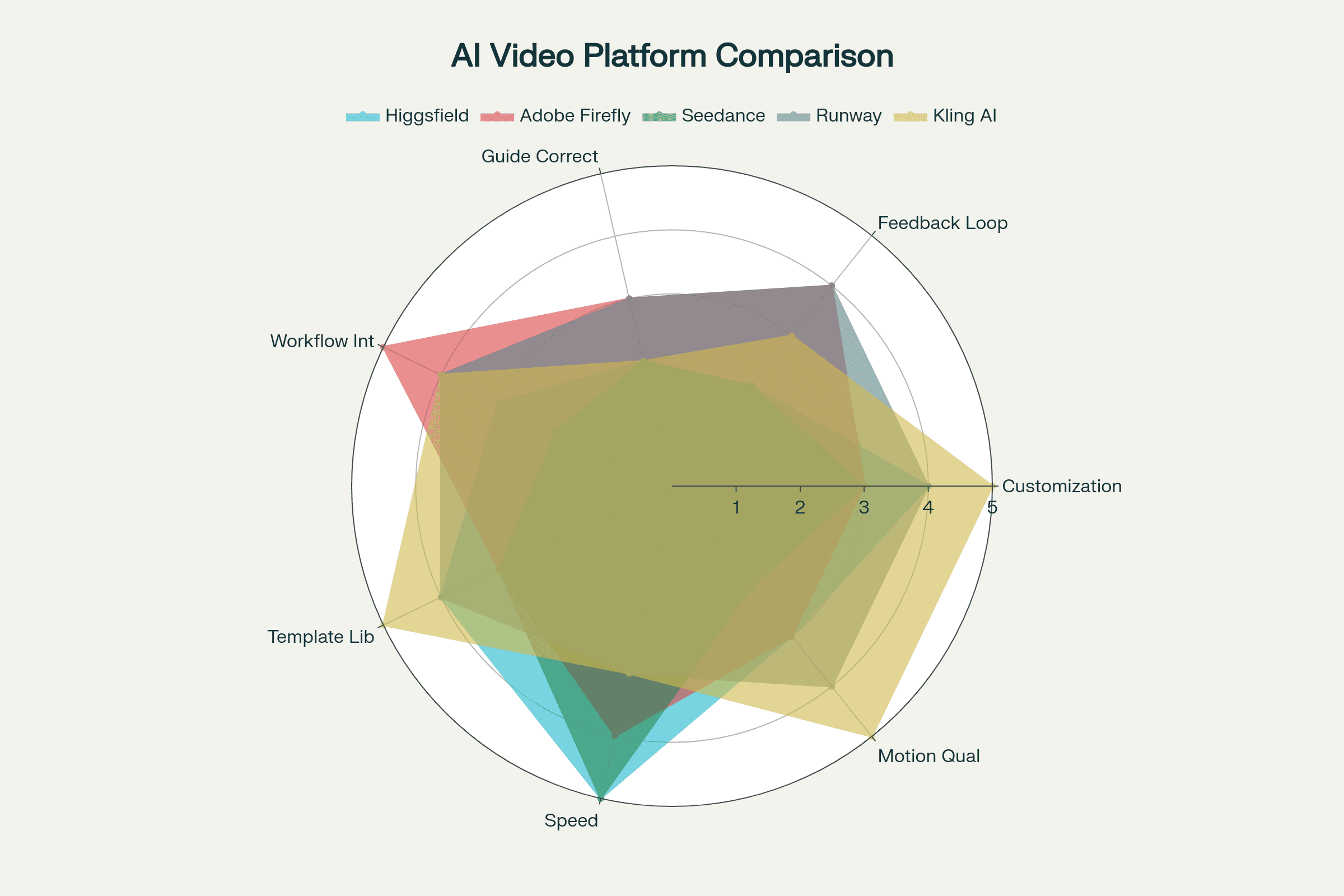
AI video generators such as Higgsfield, Adobe Firefly, Seedance, and Runway deliver industry-changing creative speed and flexibility but each has unique feedback loops, strengths, and drawbacks.

While all promise rapid transformation of footage using text, prompts, or templates, their design philosophies and user experiences differ.

AI video generators such as Higgsfield, Adobe Firefly, Seedance, and Runway deliver industry-changing creative speed and flexibility but each has unique feedback loops, strengths, and drawbacks.

While all promise rapid transformation of footage using text, prompts, or templates, their design philosophies and user experiences differ.

HMW enable video editors to create, customize, and preview AI-powered video effects directly within their timeline without workflow interruptions or the need to juggle multiple tools?

HMW enable video editors to create, customize, and preview AI-powered video effects directly within their timeline without workflow interruptions or the need to juggle multiple tools?

Effortless Timeline Integration

Editors select start and end frames directly from their active timeline,generate, and receive real-time status no window switching

Effortless Timeline Integration

Editors select start and end frames directly from their active timeline,generate, and receive real-time status no window switching

Effortless Timeline Integration

Editors select start and end frames directly from their active timeline,generate, and receive real-time status no window switching

Multi-Model Integration

Easy switching between top AI models. Experiment and select the best engine for each job, keeping up with evolving capabilities

Multi-Model Integration

Easy switching between top AI models. Experiment and select the best engine for each job, keeping up with evolving capabilities

Multi-Model Integration

Easy switching between top AI models. Experiment and select the best engine for each job, keeping up with evolving capabilities

Prompt Customization

Fine-tune every effect with customizable prompts, negative prompts, and adjustable parameters

Prompt Customization

Fine-tune every effect with customizable prompts, negative prompts, and adjustable parameters

Prompt Customization

Fine-tune every effect with customizable prompts, negative prompts, and adjustable parameters

Real-Time Status & Progress

Live thumbnail previews, ETA, and error feedback

Real-Time Status & Progress

Live thumbnail previews, ETA, and error feedback

Real-Time Status & Progress

Live thumbnail previews, ETA, and error feedback

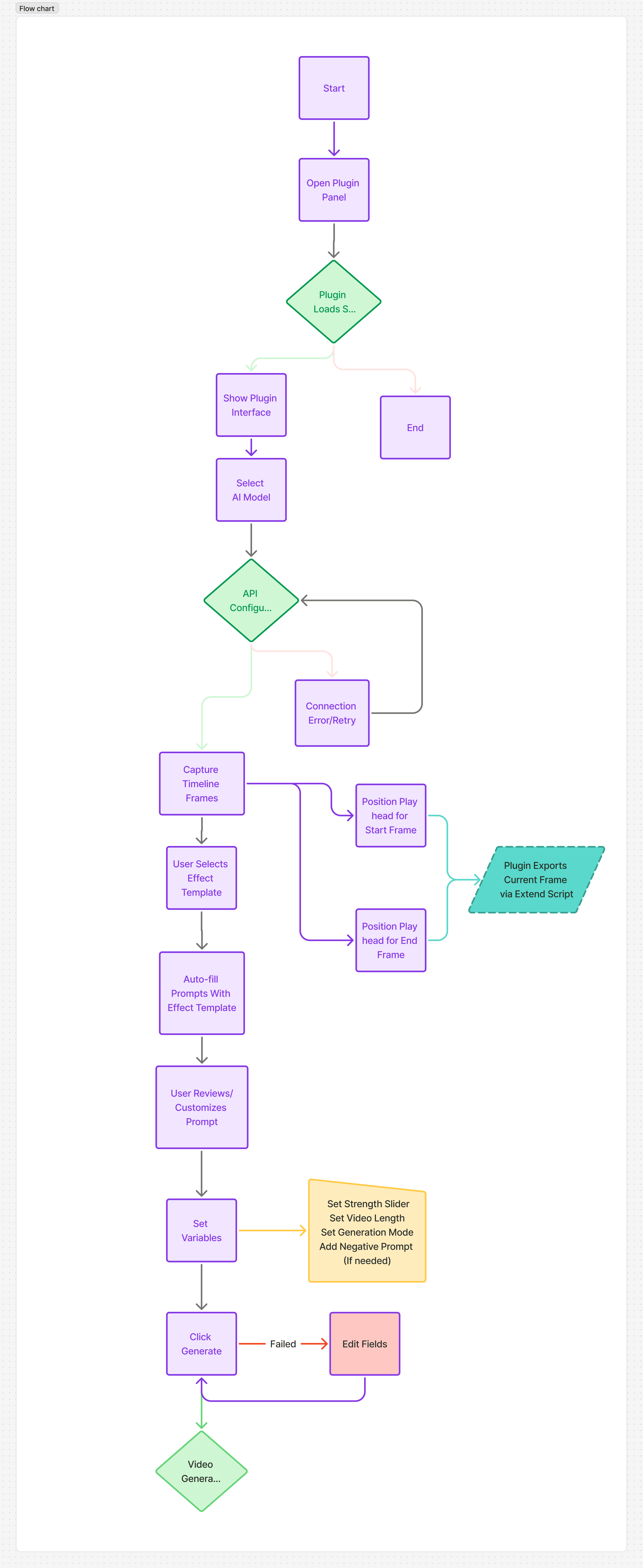
User Flow

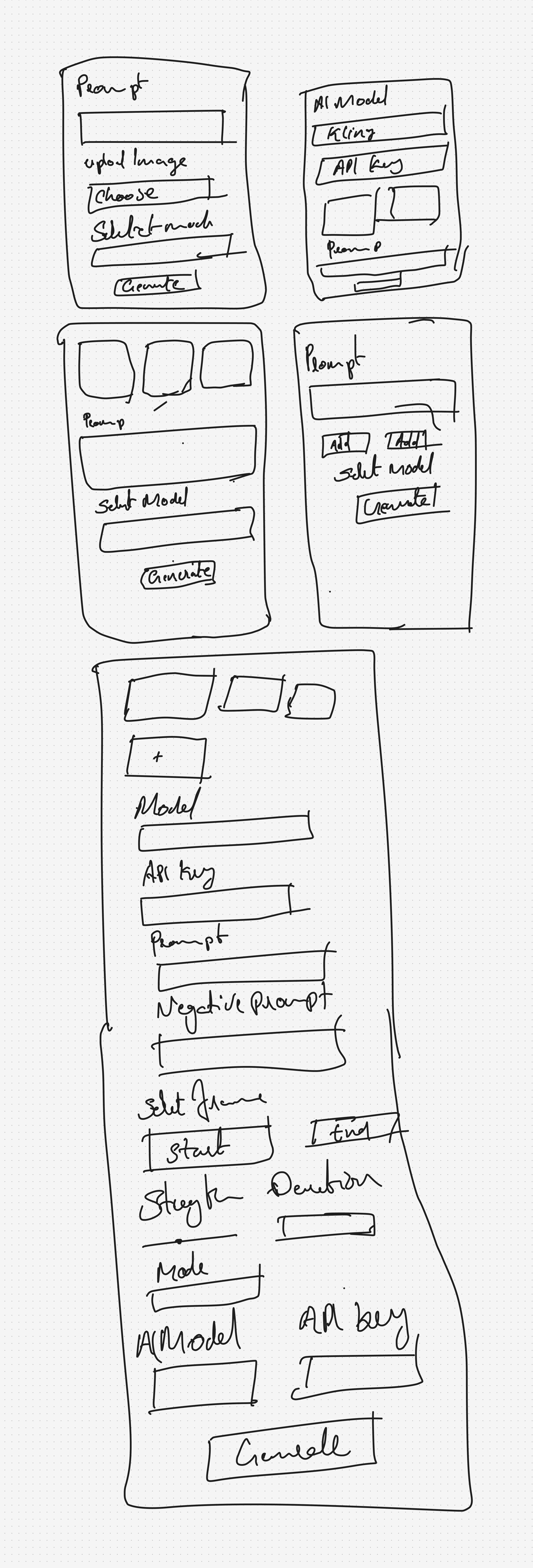
Wireframes

AI Video Generator

Instantly Transform Footage with
Multi-Model AI Transitions

Multi model engines

Refined Outputs

AI Video Generator

Instantly Transform Footage with
Multi-Model AI Transitions

Multi model engines

Refined Outputs

AI Video Generator

Instantly Transform Footage with
Multi-Model AI Transitions

Multi model engines

Refined Outputs

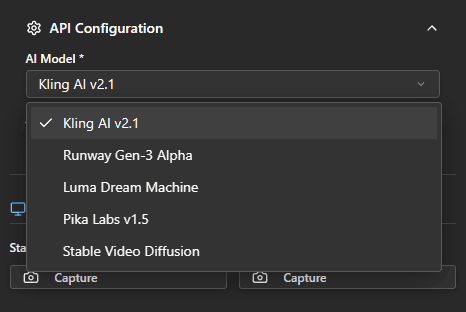
Multi Model Support & API Key Management

Let's editors choose the engine that best fits their creative needs and stay updated with the latest model capabilities.

API Key Management ensures access to advanced AI capabilities while protecting sensitive keys
Timeline Frame Capture

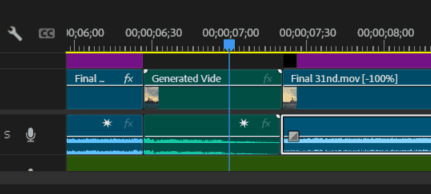
Direct integration with Premiere Pro lets users capture start and end frames from their sequence, with real-time previews and sequence info display.

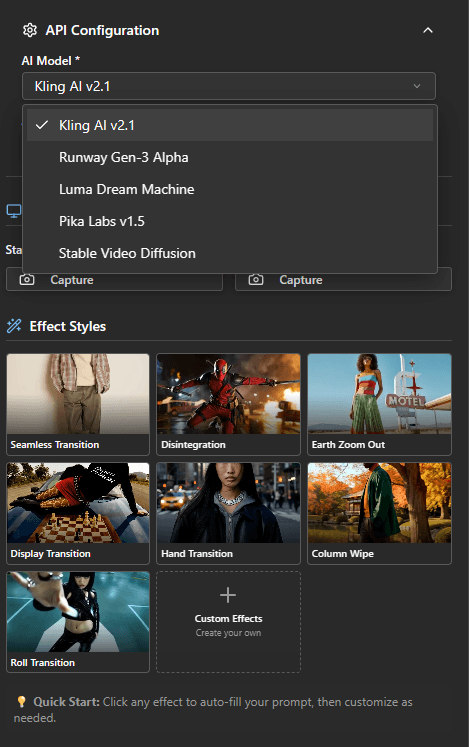
Pre-built effect templates

Pre-built templates instantly loads an optimized prompt so editors can generate effects with minimal setup.
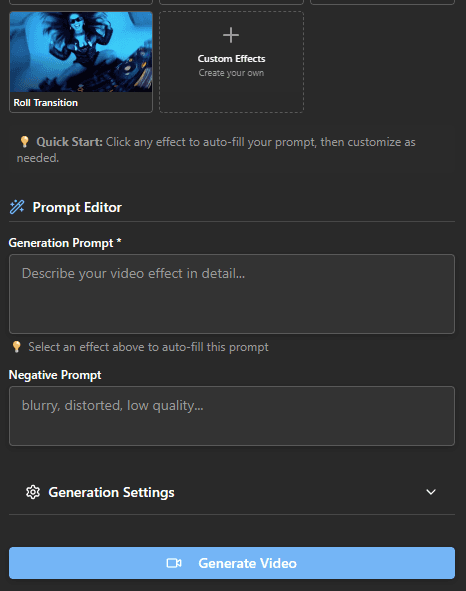
Prompt Editor

Users can describe their ideal video effect in detail or refine the auto-filled, template-based prompt. Additionally, negative prompts can exclude unwanted qualities and parameters such as blur, distortion, and low quality to achieve more targeted results.
Sample Workflow

Sample Workflow

Sample Workflow

Create & Place
Seamlessly.

Create & Place
Seamlessly.

Select your key timeline frames, choose or customize an AI-powered effect, and fine-tune the prompt to match your creative vision.

Start Frame

End Frame

Create a seamless cinematic transition between two images. Start with the first image and gradually transform into the second. The transition should feel natural, with smooth blending of colors, lighting, and perspective for a continuous flow. Keep a cinematic look with realistic textures and polished camera movement, making the cut invisible and professional

Prompt

Key Takeaways & Learnings

Film productions are increasingly distributed crews spread across cities, editors working remotely, and clients expecting rapid feedback.

Accessibility & Adoption: High API costs limit adoption among prosumer and indie users, undermining the plugin’s reach and inclusivity goals.

Workflow Flexibility: Users overwhelmingly prefer personal account logins, which are familiar and less cumbersome than generating and managing API keys.

Trust & Onboarding: Personal accounts align with user expectations for quick, secure authentication—reducing friction and support calls.

Accessibility & Adoption: High API costs limit adoption among prosumer and indie users, undermining the plugin’s reach and inclusivity goals.

Workflow Flexibility: Users overwhelmingly prefer personal account logins, which are familiar and less cumbersome than generating and managing API keys.

Trust & Onboarding: Personal accounts align with user expectations for quick, secure authentication—reducing friction and support calls.

Next Steps
Next Steps

Advocate for OAuth/Personal Account Support: Collaborate with AI providers to enable plugin logins via Google, Adobe ID, or social accounts instead of API keys.

Explore Flexible Pricing: Encourage tiered or hybrid strategies—e.g., a limited free tier for personal use within the plugin, unlocking paid API usage only for commercial volumes.

User Research: Continuously gather feedback on cost pain points and adjust onboarding or feature gating to maximize perceived value for all user segments.

Advocate for OAuth/Personal Account Support: Collaborate with AI providers to enable plugin logins via Google, Adobe ID, or social accounts instead of API keys.

Explore Flexible Pricing: Encourage tiered or hybrid strategies—e.g., a limited free tier for personal use within the plugin, unlocking paid API usage only for commercial volumes.

User Research: Continuously gather feedback on cost pain points and adjust onboarding or feature gating to maximize perceived value for all user segments.

Create a free website with Framer, the website builder loved by startups, designers and agencies.